Budgeting App Without Plaid: Track Money With No Bank Link
A budgeting app without Plaid is any app that never asks for your online banking login. You get your numbers in another way: typing them, importing a CSV, or dropping in the PDF statements your bank already gives you. PDF statements are the best of the three, because they are complete and can be checked.
Most budgeting apps start the same way: "Connect your bank." Behind that button is usually a data aggregator, and for many people that is where the trust ends. If you want the full picture of how a finance app can avoid this entirely, read The Most Private Personal Finance App. This guide is the practical version: how to track your money with no bank connection at all.
What does Plaid actually do?
Plaid is a company that sits between your bank and the app you are using, and it moves your account data from one to the other.
According to Plaid's own data page, you verify an account with your bank username and password. After that, Plaid retrieves the account information you permitted and shares it with the app. Plaid says it limits collection to what is needed and lets you review and control sharing through a portal.
That is a fair description, and plenty of people are comfortable with it. Plaid is widely used, and it can be convenient. But it is a middleman, and your data passes through a company you never chose directly.
Why do some people avoid Plaid?
The main reasons are a third party in the middle, a live link that stays open, and a past legal case.
In August 2021, Plaid agreed to a $58 million class action settlement. The customers who sued alleged that Plaid collected banking data without proper consent and used a login screen designed to look like their own bank's. Plaid denied selling data. The settlement is not a verdict, and it is old news. It still explains why some people would rather not use an aggregator at all.
There is also a simpler argument that has nothing to do with any one company. A bank connection is an open door. Every extra copy of your transactions, on every extra server, is something that can be breached, subpoenaed or changed in a policy update. We cover the wider question in Should You Connect Your Bank to a Budgeting App? and Do Budgeting Apps Sell Your Data?
What are the alternatives to linking your bank?
There are three: type it in, import a CSV, or import PDF statements.
| Method | Effort | How complete | Can you check it? |
|---|---|---|---|
| Manual entry | High. Every purchase, by hand. | Only what you remember to enter | Only against your own memory |
| CSV import | Low. One file per account. | Usually recent months only | Rarely. CSVs carry no printed totals. |
| PDF statement import | Low. One file per month. | Years of history, every transaction | Yes, against the totals printed on the statement |
Manual entry
Manual entry gives you total control and no data sharing. It also falls apart fast. Skip a week and your balance is wrong. Most people quit within a couple of months.
CSV import
Many banks let you export recent transactions as a CSV. It is quick, and it needs no login in the app. The catch is that banks often limit how far back a CSV goes, the columns differ from bank to bank, and a CSV has no printed totals to check against. If a row is missing, nothing tells you.
PDF statement import
Every bank gives you monthly PDF statements, and they usually go back years. A statement is also the one record your bank prints with its own totals: opening balance, closing balance, total deposits, total withdrawals. That makes it the only no-connection method you can actually verify.
Why are PDF statements the best option?
PDF statements are the best option because they are complete, they are available everywhere, and they can be proved.
- Every bank has them. Small credit unions, big banks, credit cards, loans. No special support needed.
- They go back years. You can load a full history on day one instead of waiting for a feed to build it.
- They have printed totals. If the transactions you imported do not add up to the bank's totals, you know something is missing or misread.
- They need no login. You download them yourself, in your bank's own site, the way you always do.
This is how Quill works. It reads each statement on your computer and checks it against the totals the bank printed, to the cent. A statement that does not add up is flagged, never silently counted. The same idea is behind local-first finance apps: your numbers live in a file on your computer, not in a company's database.
How do you track money with no bank connection, step by step?
You download your statements, drop them in a folder, sync, and check the result. Here is the full routine.
- Download your statements. Log in to each bank or card site yourself and download the monthly PDF statements. Start with the last 12 months if you want a useful year, or go further back.
- Put them in one folder. One folder, any file names. You do not have to sort them.
- Sync. Quill reads the folder on your computer and builds your accounts, transactions and categories.
- Check the result. Each statement shows whether it adds up to the bank's printed totals. Fix or re-read anything that is flagged.
- Repeat monthly. When a new statement lands, drop it in the folder. It takes a couple of minutes.
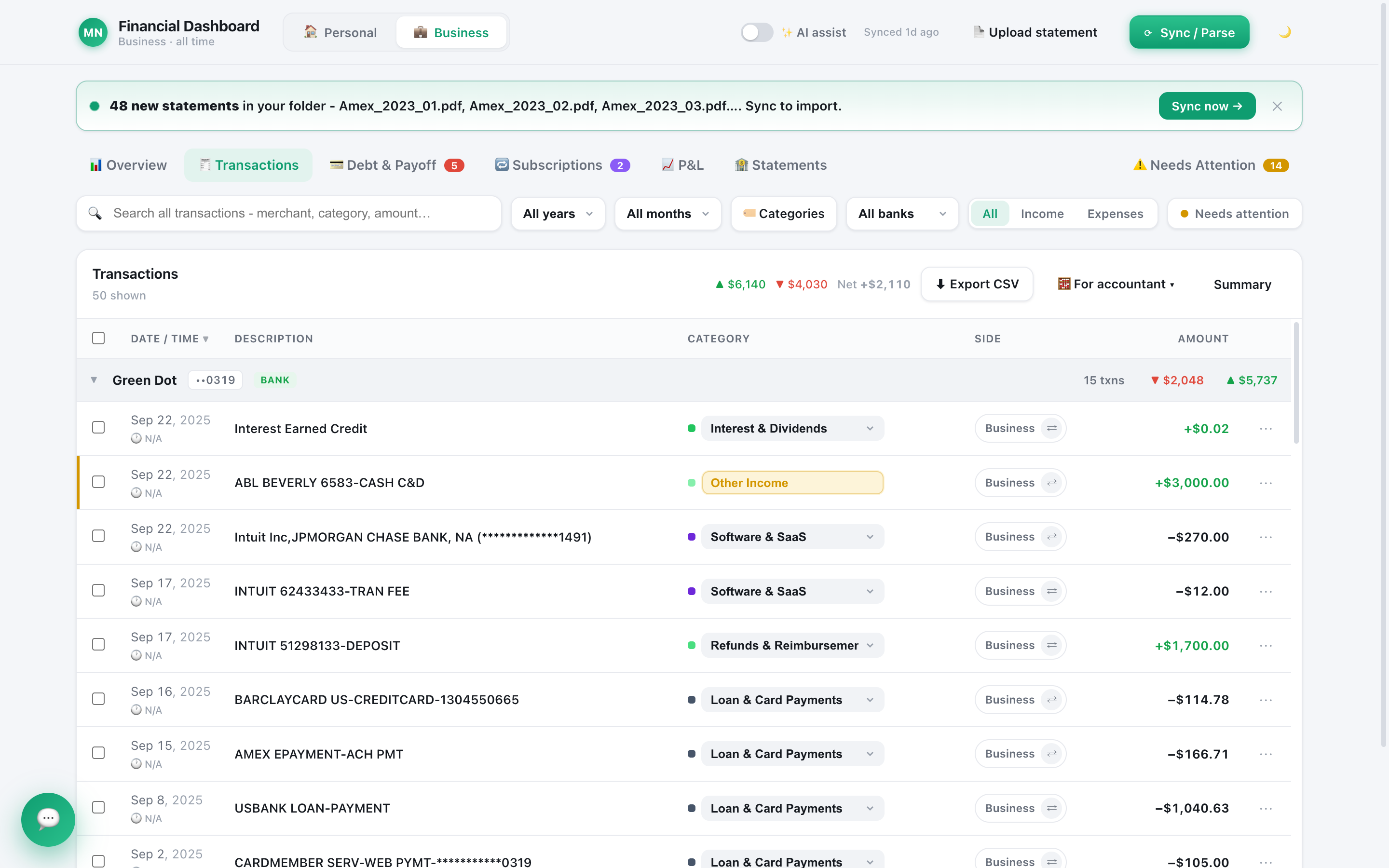
Once your statements are in, you can see where the money goes in the Transactions view:
What are the trade-offs?
Honest answer: statements are monthly, so your numbers are as fresh as your last download. If you need a live balance on your phone every hour, a bank connection is faster. If you want accurate monthly books, a budget you trust, and no third party holding your data, statements are enough, and they are more reliable.
A few other limits to know. Quill does go online for two small things: it checks your licence about once a day and looks for app updates at launch. Neither carries any transaction or balance data. The optional AI assistant is a cloud service, and if you use it, the AI provider you chose sees what it needs to answer your question. With AI off, none of your financial data leaves your computer.
Which approach should you pick?
Pick PDF statements if you want accuracy, CSV if you only need a quick look at recent months, and manual entry only for small, simple cases.
If you are also thinking about handing statements to a general chatbot, read Is It Safe to Upload Bank Statements to ChatGPT? first. And for a wider look at which apps keep your data off their servers, see Is It Safe to Share Your Bank Statements with Finance Apps?
Frequently asked questions
Is there a budgeting app that does not use Plaid?
Yes. Some apps rely on manual entry, some import CSV files, and some read PDF statements. Quill reads statements you download yourself, so it never asks for your bank password and has no bank connection to set up.
Is Plaid unsafe?
Plaid says it limits what it collects and lets you review and control sharing. Its 2021 settlement shows why some people still prefer not to hand over a banking login at all. The safest choice is the one that needs no login, whatever the provider promises.
Can I budget without linking my bank account?
Yes. Download statements from your bank, import them, and categorize the charges. It takes a few minutes a month, and you decide exactly what the app can see.
Does Quill connect to my bank?
No. Quill has no bank login, no aggregator and no account to create. You drop PDF or CSV statements into a folder and it reads them on your computer.
Budget with no bank login
Quill reads the statements you already download, checks each one adds up to the cent, and keeps your books on your computer. One-time purchase, no subscription.
Get Quill