The Most Private Personal Finance App: Why Quill Never Holds Your Data
The most private personal finance app is one that never holds your money data at all. Quill reads the PDF statements you download yourself, on your own computer. There is no bank login, no Quill account and no server copy of your transactions, so there is nothing of yours on our side to breach, sell or lose.
Most budgeting apps are built the same way. You hand over your online banking login, a data company keeps a live connection to your accounts, and years of your transactions sit on a server you will never see. That design is convenient. It is also the reason "private" and "personal finance app" rarely belong in the same sentence.
This guide explains what actually makes a finance app private, how to check any app's claims in ten minutes, and how Quill is built so that the most sensitive copy of your money data never leaves your hands. It also lists the honest limits, because a privacy claim you cannot check is just marketing.
What makes a personal finance app private?
A finance app is private when it never collects your financial data in the first place. Encryption, certifications and long privacy policies all describe how a company protects data it already holds. The stronger position is to hold nothing.
There are three ways a finance app usually ends up with your money data. Check every app you use against all three:
- A bank connection. Most budgeting apps link to your bank through a data aggregator. You sign in once, and from then on a third party can keep pulling your balances and transactions until you revoke it.
- A cloud account. Your transactions, categories and notes are stored on the company's servers so they can sync across devices. That copy can be breached, shared under the privacy policy, handed over under a legal demand, or kept after you leave.
- Analytics and telemetry. Many apps report how you use them back to the company, sometimes through third-party tools. Even when no balances are sent, usage data can reveal a lot.
An app that avoids all three cannot leak your transactions from its side, because it never had them.
Why bank connections are the biggest privacy risk
A bank connection is the biggest risk because it is ongoing access, not a one-time upload. Once you link an account, the aggregator can refresh your data on a schedule, and the app often keeps your history long after you stop opening it.
The trade-off is real, not theoretical. In 2021 Plaid, the best-known bank aggregator, agreed to a $58 million settlement of a class action in which users alleged the company obtained and used their banking information without permission. Plaid denied wrongdoing and said it has never sold data. Whatever you make of the case, it shows how much of your financial life flows through a company you may never have chosen directly.
If you want the full picture of what linking grants, read our guide on whether it is safe to share bank data with finance apps.
How Quill keeps your money data off every server
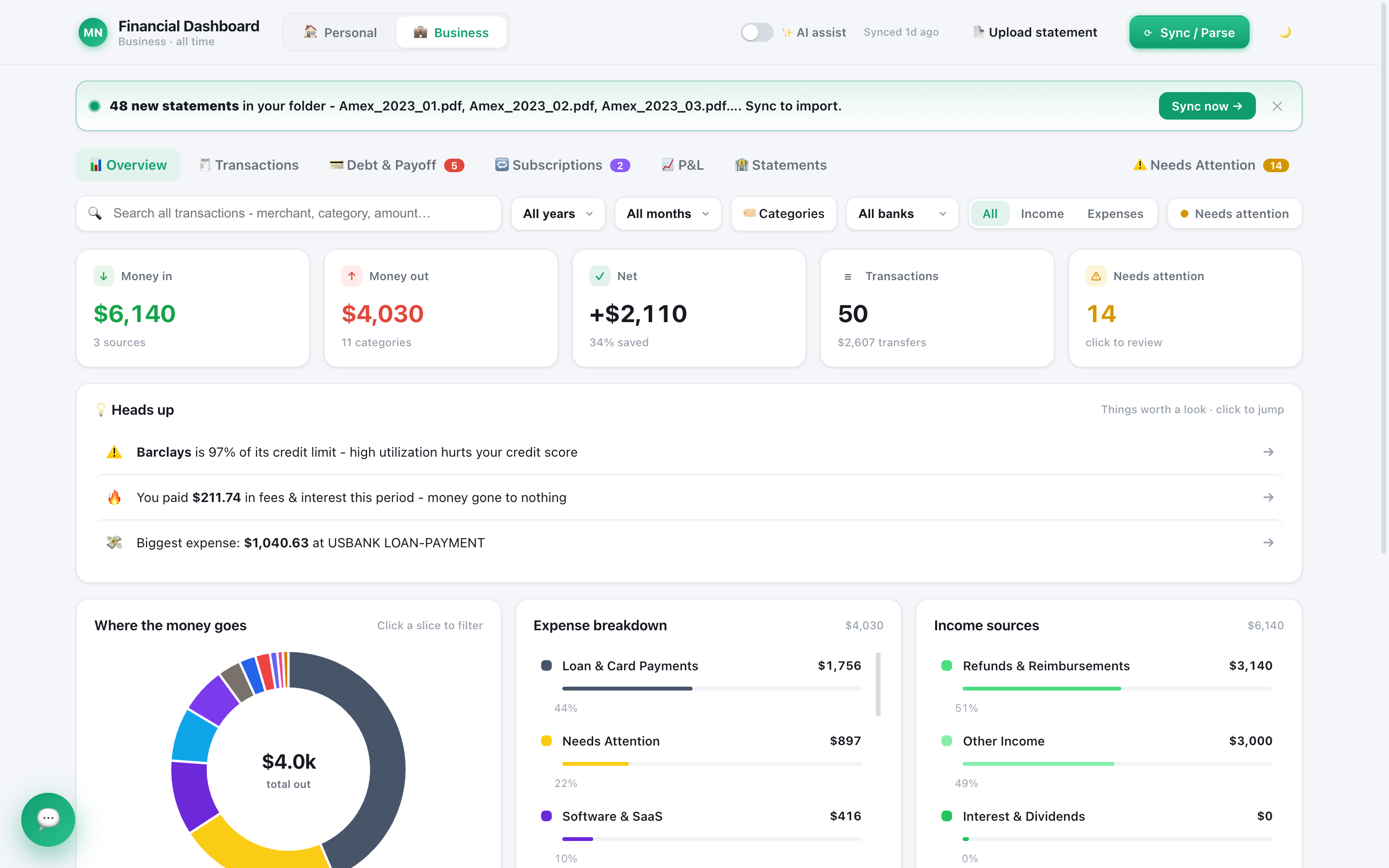
Quill is a desktop app for Mac and Windows that works from the statements your bank already gives you. You download your monthly PDF (or CSV) statements, drop them in a folder, and Quill reads them on your computer.
- No bank login. Quill never asks for your online banking password and uses no bank aggregator. There is no connection to revoke because there never was one.
- No account. You buy Quill once and get a licence key. There is no sign-up, no profile and no cloud copy of your books.
- Your books live in a file on your computer. Transactions, categories, rules, budgets and notes are stored locally. There is no central database of Quill users' money, so there is nothing of yours on our side to breach.
- No analytics inside the app. Quill has no telemetry or crash reporting. If something goes wrong, it writes a problem report to a folder on your computer, and it only reaches us if you email it yourself.
- Every statement is proved. Quill checks each statement against the totals your bank printed on it, to the cent, and flags any that do not add up. Privacy is worth little if the numbers are wrong.
This is the same idea behind why local-first finance apps are safer than cloud ones: keep the most sensitive copy where only you can reach it.
Quill vs a typical cloud budgeting app
Here is how the two designs compare on the questions that decide your privacy. "Typical cloud app" describes the common bank-linked model, not any one product.
| Question | Typical cloud budgeting app | Quill |
|---|---|---|
| Needs your bank login? | Usually, through an aggregator | Never |
| Where your transactions live | The company's servers | A file on your computer |
| Account required? | Yes, email and password | No, a licence key only |
| Analytics inside the app | Common | None |
| What a breach on the company's side exposes | Your linked accounts and history | None of your transactions (we never had them) |
| What an AI feature sees | Varies, often your full history on their servers | Only what is needed for your question, sent to the AI provider you picked |
| Works across phone and laptop | Yes | No, it is a desktop app |
That last row matters. Cloud apps win on multi-device sync, and if checking your budget on your phone is the priority, that is a fair reason to choose one. Quill is built for people who would rather keep the data than sync it.
Why encryption claims are not the same as privacy
Encryption protects data a company already holds. Privacy is about whether the company holds it at all. The two get blurred in marketing, so it helps to separate them.
When a cloud budgeting app says your data is encrypted, it usually means two things: the connection between your device and their servers is encrypted, and the disks in their data center are encrypted. Both are good and both are standard. Neither changes the fact that the company can read your transactions, because its software has to read them to show you charts, run its features and power its AI.
That is why the questions that decide your privacy are about collection, not protection:
- Who can read my transactions? With a cloud app, the company and anyone it shares with under its policy. With Quill, only people with access to your computer, plus the AI provider you picked for the questions you ask it, if you use AI.
- What happens if the company is breached? With a cloud app, your history may be part of what is taken. With Quill, there is no server copy of your money to take.
- What happens if the company changes its policy, is sold or shuts down? With a cloud app, your data goes wherever the company goes. With Quill, your books stay in a file you control, and you can export everything to CSV whenever you like.
Encryption still matters on your side. That is why Quill checks whether your own disk encryption is switched on, and why we recommend it for every computer that holds financial records.
What still goes online, honestly
No app that you can buy, keep updated and use with AI can avoid the internet entirely, and you should be wary of any that claims to. Here is exactly what Quill sends, and what it carries.
- Licence check. About once a day, Quill confirms your licence key with our payment provider. It sends the key and a device label, never any transaction, balance, merchant or statement.
- Update check. At launch, Quill asks GitHub whether a new version exists. Updates download only when you click.
- Password reset codes. If you use Quill's optional passwords and ask for a reset, it emails a six-digit code to your address. That request carries your email, your name and the code, nothing financial.
- AI, only when you use it. Every AI option is a cloud service: your Claude subscription, your ChatGPT subscription, or an Anthropic, OpenAI or Google API key. When you ask the assistant something, a summary of your finances (totals, trends, top categories and merchants, largest charges, subscriptions and debts) and any charges it looks up go to the provider you picked. If you ask AI to read a tricky statement, that statement's text goes too. Your PDF files themselves are never uploaded, and receipts are read on your computer, never by an AI.
Switch AI off and none of the AI traffic happens. The rest never contains your money data.
Your own computer is the last line of defense
Keeping data local moves the responsibility to your computer, so treat it well. A stolen laptop or malware is still a risk with any app.
- Turn on disk encryption. Quill relies on FileVault (Mac) or BitLocker (Windows) to protect its files, and Settings shows whether yours is on. Disk encryption protects everything, including your statement PDFs.
- Use Quill's passwords on a shared computer. Each person can have a separate private library with its own password, and Quill locks itself after 15 minutes idle. See how to track your net worth privately for a routine that keeps it that way.
- Back up. Quill keeps its own backups, and you should still copy your statements folder somewhere safe.
- Keep your system updated. Security fixes for your operating system matter more than any app setting.
How to check any finance app's privacy claims in 10 minutes
You do not have to take our word, or anyone's. Ask these questions of every finance app you use, Quill included:
- Does it ask for my bank login? If yes, a third party will hold ongoing access.
- Do I need an account? An account means a server-side copy of something.
- Where are my transactions stored? Look for a plain answer, not "securely in the cloud".
- What does the privacy policy say about sharing? Search it for "share", "affiliates", "aggregated" and "de-identified".
- How long is data kept after I leave? Look for a retention period and a delete option.
- Does the app send analytics? Many policies list their analytics partners.
- What does the AI see, and where does it run? "AI-powered" usually means your data is processed in the cloud.
- Can I export everything and walk away? Your data should leave with you in a standard format like CSV.
If an app passes all eight, it is genuinely private. If it fails the first two, its privacy depends entirely on a company you have to trust. For a practical alternative to bank-linked tools, see our Mint alternative that never connects to your bank.
Who Quill is for, and who it is not for
Quill fits people who want a complete, accurate picture of their money without handing it to anyone: freelancers and small business owners who keep personal and business money apart, households that want every account in one place, and anyone who has been burned by a data breach or a broken bank connection.
It is not the right fit if you want live balances on your phone every hour, or automatic syncing without downloading statements. Downloading a month of statements takes a few minutes. In exchange, nothing about your money sits on someone else's server.
Every guide in this series
- The Best Mint Alternative That Doesn't Connect to Your Bank
- Is It Safe to Share Your Bank Statements with Finance Apps?
- Why Offline, Local-First Finance Apps Are Safer Than Cloud Ones
- How to Track Your Net Worth Privately
- Is It Safe to Connect Your Bank to ChatGPT?
- Should You Connect Your Bank to a Budgeting App?
- Do Budgeting Apps Sell Your Data? How to Check
- Is It Safe to Upload Bank Statements to ChatGPT?
- Budgeting App Without Plaid: Track Money With No Bank Link
Frequently asked questions
What is the most private personal finance app?
The most private finance apps are the ones that never receive your data: no bank login, no account and no cloud copy of your transactions. Quill works this way. It reads statements you download yourself and keeps your books in a file on your own computer.
Is a budgeting app without a bank login really safer?
It removes the two biggest exposures: a third party holding ongoing access to your bank, and a company server holding years of your transactions. Your own computer still needs care, so turn on FileVault or BitLocker and use a password.
Does Quill send my financial data anywhere?
With AI switched off, no financial data leaves your computer. Quill still checks its licence key and looks for app updates online, without any transaction data. If you turn AI on, the AI provider you choose sees what it needs to answer your question.
Does Quill encrypt my data?
Quill keeps your books in a file on your computer and relies on your disk encryption to protect it. Settings shows whether FileVault (Mac) or BitLocker (Windows) is on, and links to where you turn it on. Disk encryption protects every file, your statement PDFs included.
Can I still use AI if I care about privacy?
Yes, on your terms. AI is optional, and nothing goes to an AI until you ask it something or press an AI button. You pick the provider (your Claude or ChatGPT subscription, or an API key), your PDF files are never uploaded, and you can switch AI off at any time.
Keep your money data on your own computer
Quill reads your statements on your computer, proves every one adds up to the cent, and never asks for your bank login. One-time purchase, no account.
Get Quill