Chat With Your Bank Statements: An AI That Shows Its Receipts
You can chat with your bank statements using Quill's assistant. It searches your verified ledger, answers with dates and amounts, and offers a Show me button that highlights exactly those rows so you can check. If your data cannot answer, it says "Not in your data" instead of guessing.
Most people have a year or more of bank statements sitting in a folder, and no good way to ask them anything. "Did my landlord ever refund that deposit?" should take ten seconds, not an evening. This guide shows what chatting with your statements looks like when the answers come with proof. It is part of our look at an AI financial assistant that does the work.
What can you ask your bank statements?
You can ask plain questions about what happened in your accounts, and Quill's assistant answers from your own ledger. Here are the kinds of questions that work well.
- "Did Lemonade ever reimburse me?"
- "When did I last pay rent?"
- "How much did I spend on Adobe in 2025?"
- "What are my biggest charges this quarter?"
- "Which months am I missing statements for?"
The assistant has a fixed set of actions. For these questions it uses the look-ups, such as finding charges by words, dates or amounts, money in and out, spending by category, and statement health. They run straight away and change nothing.
How does it find the answer?
It searches your verified ledger, not a pile of loose files. Quill has already read each statement on your computer and checked it against the totals your bank printed on it, to the cent. A statement that does not add up is flagged, never silently counted.
So when you ask about rent, the assistant looks up charges that match your words and dates, then answers with the date and amount of each. It does not rebuild the numbers from scratch every time you ask.
What does the Show me button do?
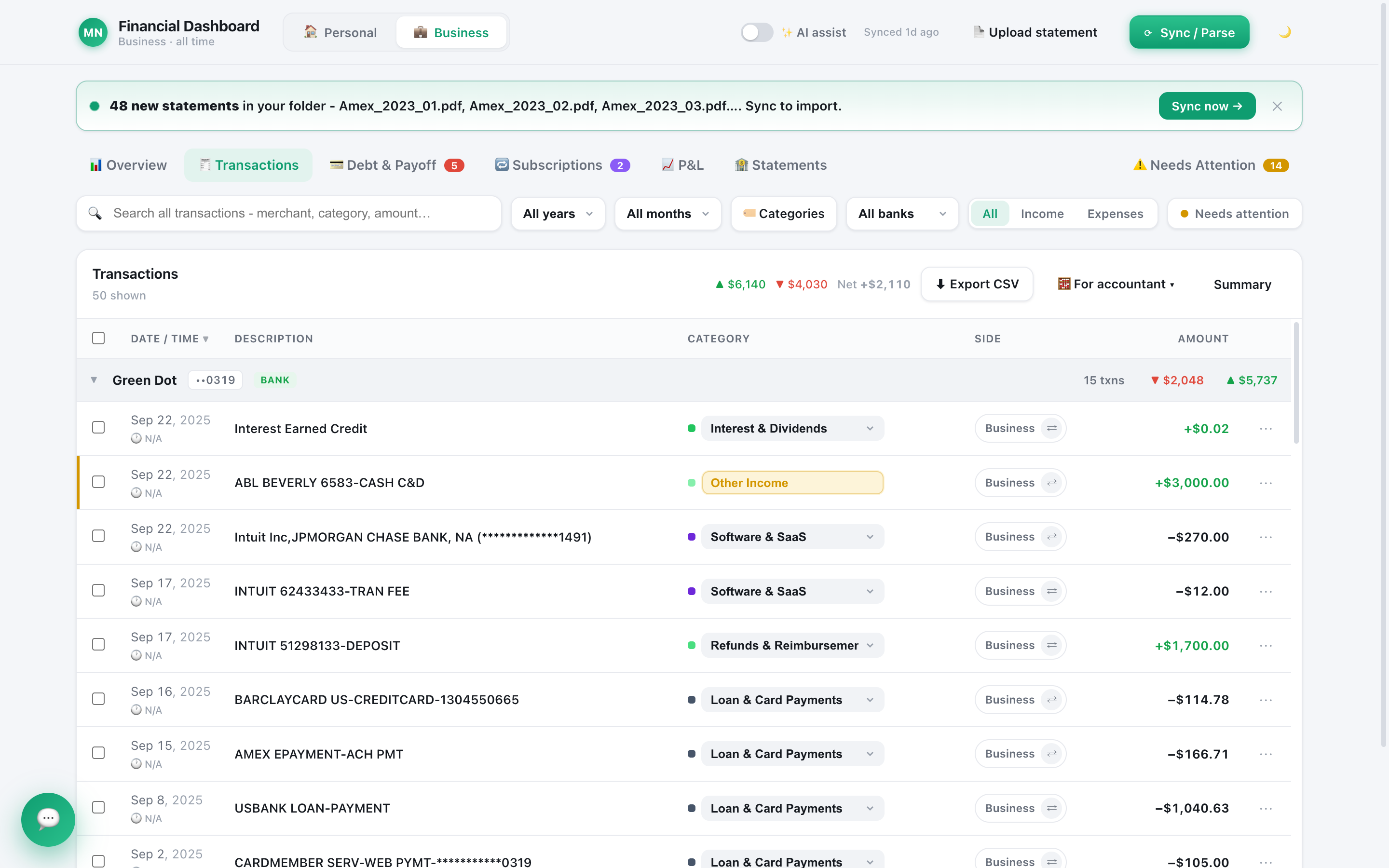
Show me opens the ledger with exactly the charges the assistant found, highlighted and scrolled into view. You do not have to trust the sentence. You look at the rows.
That matters for questions like "How much did I spend on Adobe in 2025?" If the answer is a sum, you can see every line that went into it. If one row looks wrong, you can fix the category or rule right there in the ledger.
Here is a quick look at the screens the ledger lives in:
What happens when the data cannot answer?
It says "Not in your data." That includes questions about a month you never imported, or a merchant that does not appear in your statements.
It also never treats missing data as zero. If a statement is missing for a month, the assistant can tell you the month is missing, instead of reporting that you spent nothing. A debt with an unknown interest rate is never ranked. It asks you.
How is this different from pasting a PDF into a chatbot?
A general chatbot starts from a blank chat. You upload a file, it reads that one file, and the numbers are rebuilt each time.
| Question | Pasting a PDF into a chatbot | Quill's assistant |
|---|---|---|
| What it works from | The one file you uploaded | Your whole verified ledger across statements |
| Proof the totals are right | None built in | Each statement checked to the cent against the bank's printed totals |
| Checking an answer | Scroll the PDF yourself | Show me highlights the exact rows |
| Memory of your fixes | Starts over next time | Your categories and rules are saved |
| When it does not know | May answer anyway | Says "Not in your data" |
General chatbots can be confidently wrong about figures, which is why the check matters. For more on that, read what ChatGPT gets wrong when it manages your finances.
Can it change things, or only answer?
It can propose changes, and only your click applies them. Examples are setting a merchant's category, creating a rule, or moving charges to Personal or Business. Each proposal card says how many charges and how much money it touches, and states that nothing has happened yet. Quill saves a safety backup before it applies anything.
There are hard limits. It cannot delete statements or transactions, move money, pay bills or cancel subscriptions. It only talks about your finances, and it is not a licensed financial advisor. If you want the cleanup side, see how to automatically categorize bank transactions.
Is it private to ask an AI about your spending?
Your statements and your ledger live on your computer, not on our servers. Your PDF files are never uploaded anywhere, even with AI on.
Asking the assistant is a different step, and you should know what it sends. Every AI option is a cloud service. When you ask something, a summary of your finances (totals, trends, top categories, top merchants, largest charges, subscriptions and debts) plus any charges it looks up go to the AI provider you picked. Switch AI off and none of that happens. You can use your own Claude or ChatGPT subscription, so there is no extra AI fee from Quill. Our guide to using your ChatGPT or Claude plan to run your finances covers the setup.
So, can you really chat with your bank statements?
Yes, and the useful kind of chat ends with rows you can inspect. Ask the question, read the answer with its dates and amounts, press Show me, and check. When your data cannot answer, you get "Not in your data" instead of a confident guess.
Frequently asked questions
Can AI read my bank statements?
Yes. Quill reads your PDF or CSV statements on your computer and checks each one against the totals your bank printed. Its assistant then answers from that checked ledger. Your PDF files are never uploaded, even with AI on.
How do I know the AI's answer is right?
When it finds charges, a Show me button opens the ledger with exactly those rows highlighted. You compare the answer to the rows yourself. Every answer also says which AI produced it.
What happens if my statements do not contain the answer?
The assistant says "Not in your data." It does not fill gaps with a guess, and it does not treat missing data as zero.
Is it private to ask an AI about my spending?
With AI on, the provider you chose sees a summary of your finances plus any charges it looks up, because every AI option is a cloud service. With AI off, none of your financial data leaves your computer.
Ask your books, then check the rows
Quill is a Mac and Windows app with a one-time purchase and no subscription. The assistant works on statements Quill has already proved to the cent.
Get Quill