An AI Financial Assistant That Does the Work, Not Just the Talking
A useful AI financial assistant does three things a chatbot cannot: it answers from numbers that have been checked, it can act on your books instead of telling you where to click, and it refuses to guess. Ask Quill works on statements proved to the cent, proposes every change for your approval, and moves no money.

Most "AI for your money" products are a chat box on top of somebody else's data. You ask a question, the AI reads whatever it was given, and you get a confident paragraph back. Sometimes the paragraph is right. Sometimes a missing month quietly becomes a month of zero spending, a refund becomes income, or a debt gets ranked on an interest rate the AI invented.
An assistant that is genuinely useful with money has to be built differently. This guide sets out what an AI financial assistant should do, the guardrails it needs, and how Quill's assistant, Ask Quill, is built to do the work on your books without guessing and without acting behind your back.
What should an AI financial assistant actually do?
An AI financial assistant should answer from checked numbers, act on your records when you ask, and tell you plainly when your records cannot answer. Everything else is presentation.
- Answer from verified figures. If the underlying statements do not add up, every answer built on them inherits the error.
- Act, not just advise. "Set all Adobe charges to Software" should be one click, not a tour of the settings menu.
- Show its work. When it says you paid rent on August 3, you should be able to see that exact row.
- Refuse to guess. Unknown interest rates, missing months and unclear charges should become questions, not assumptions.
- Never act without you. Anything that changes your records should wait for your approval, and nothing should ever move money.
Why a chatbot on its own falls short with money
General chatbots are excellent at explaining concepts and talking through options. The trouble starts when they work on your actual numbers.
In a blank chat, the AI only knows what you paste or upload in that conversation. It re-reads your files each time, does arithmetic by predicting text, and has no saved categories, rules or history to stay consistent with. It cannot tell whether the statement you uploaded is complete.
Linked-account assistants solve part of this. ChatGPT's Finances feature, for example, connects your accounts through Plaid, syncs and categorizes your transactions and shows a dashboard. OpenAI says it can see balances, transactions, investments and liabilities, cannot make changes to your accounts, and is not a replacement for professional financial advice. That is a real step forward for convenience, at the cost of a live bank connection and a copy of your data on someone else's servers. If that trade-off worries you, our guide to the most private personal finance app explains the alternative.
Quill takes a third path: your statements are read and proved on your own computer first, and the assistant works on top of that verified record.
How Ask Quill works on verified books
Quill reads the PDF or CSV statements you download from your bank and checks every one against the totals the bank printed on it, to the cent. A statement that does not add up is flagged with the exact dollar difference, never silently counted. Only then do the figures reach the assistant.
That one design choice removes the most common way an AI gets money wrong. It is not guessing at your spending from an incomplete upload. It is reading a ledger that has already been reconciled, and it knows which months are missing because Quill tracks missing statements by account.
Three kinds of help: look-ups, buttons and proposals
Ask Quill does not get free rein over the app. It gets a fixed list of 44 actions, in three kinds, and nothing else.
1. Look-ups that run straight away (15)
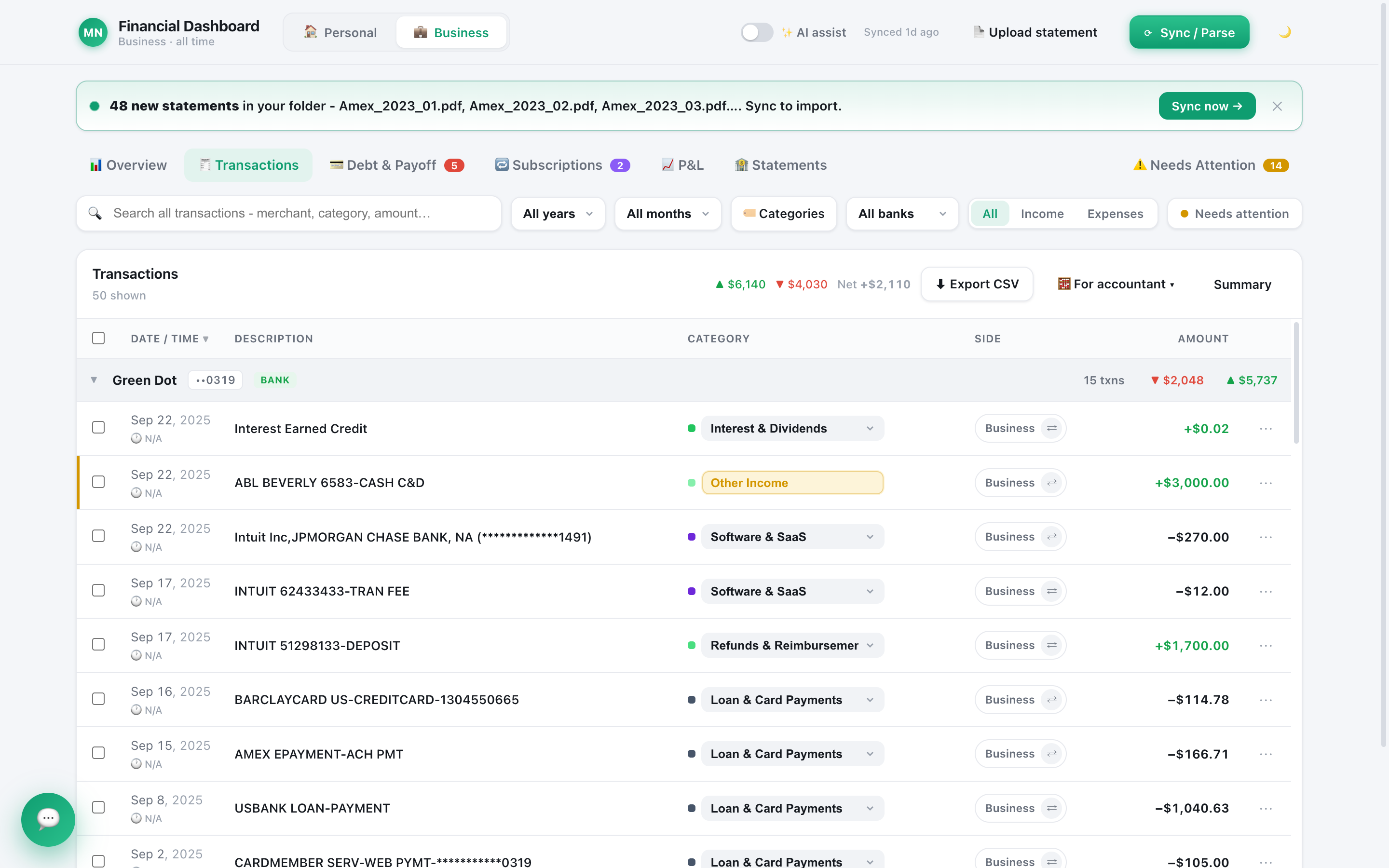
These read your books and change nothing. Ask "How much did I spend on software in 2025?", "When did I last pay rent?" or "What am I paying for every month?" and the assistant runs a real search over your charges, by words, dates or amounts, instead of estimating. It can total money in and out, break spending down by category and month, list accounts with the date each balance was stated, show which statements are verified, and name the months that are missing.
2. Buttons it offers, which you press (15)
When the answer is a place in the app, it hands you a button. The most useful is Show me: it opens the ledger with exactly the charges it talked about highlighted, so you can check its answer yourself in a second. Other buttons open the original PDF, build any report, open the debt plan, start the tax checklist or set a budget.
3. Changes it proposes, which you approve (14)
This is where an assistant stops being a chat. Ask it to "put every Adobe charge under Software", "move these client payments to Business", "mark my old Discover card as closed" or "set my Amex rate to 29.99%", and it prepares the change as a card that says exactly how many charges and how much money are involved, followed by "Nothing has happened yet." Only your click applies it, and Quill saves a safety backup first.
The guardrails that stop it guessing or overreaching
An assistant you can trust with your books is defined as much by what it cannot do. These limits are built in, not left to the AI's judgment:
- A fixed action list. If an action is not on the list, the assistant cannot do it, however it is asked.
- No deleting, no money. It cannot delete statements or transactions, move money, pay bills, cancel subscriptions, or touch your licence, backups or AI settings.
- Your click, every time. Every change waits for your approval and is preceded by a backup.
- Limits on bulk changes. A bulk change needs a filter and is capped at 500 charges, so one vague request cannot rewrite your whole history.
- "Not in your data." When your records cannot answer, it says so instead of filling the gap. Missing months are never treated as zero.
- No invented interest rates. If a statement does not print a debt's rate, the assistant will not rank or plan that debt. It asks you for the rate.
- Text is data, not instructions. A merchant name or a line in a statement that tries to give the AI orders is treated as plain data, which protects you from prompt injection hidden in your own files.
A to do list that finds the work for you
The best help often arrives before you ask. A red badge on the assistant counts things in your books worth your attention, found by 32 checks that run on plain arithmetic, not AI. Examples: a payment due, a card whose rate went up, interest that keeps climbing, a subscription that raised its price, a charge after you cancelled, a possible double charge, fees, spending above income, a missing statement month, a statement that does not add up, and tax season approaching.
Each item has Help me, which walks through the fix step by step and offers a button for the part Quill can do, plus Remind me later and Dismiss. It never touches your bank. When a step is "pay this card", it tells you to do it on your bank's own site. And it will not turn an old balance into advice: a bank balance more than 45 days old is ignored rather than trusted.
Planning a windfall: which debts to pay first
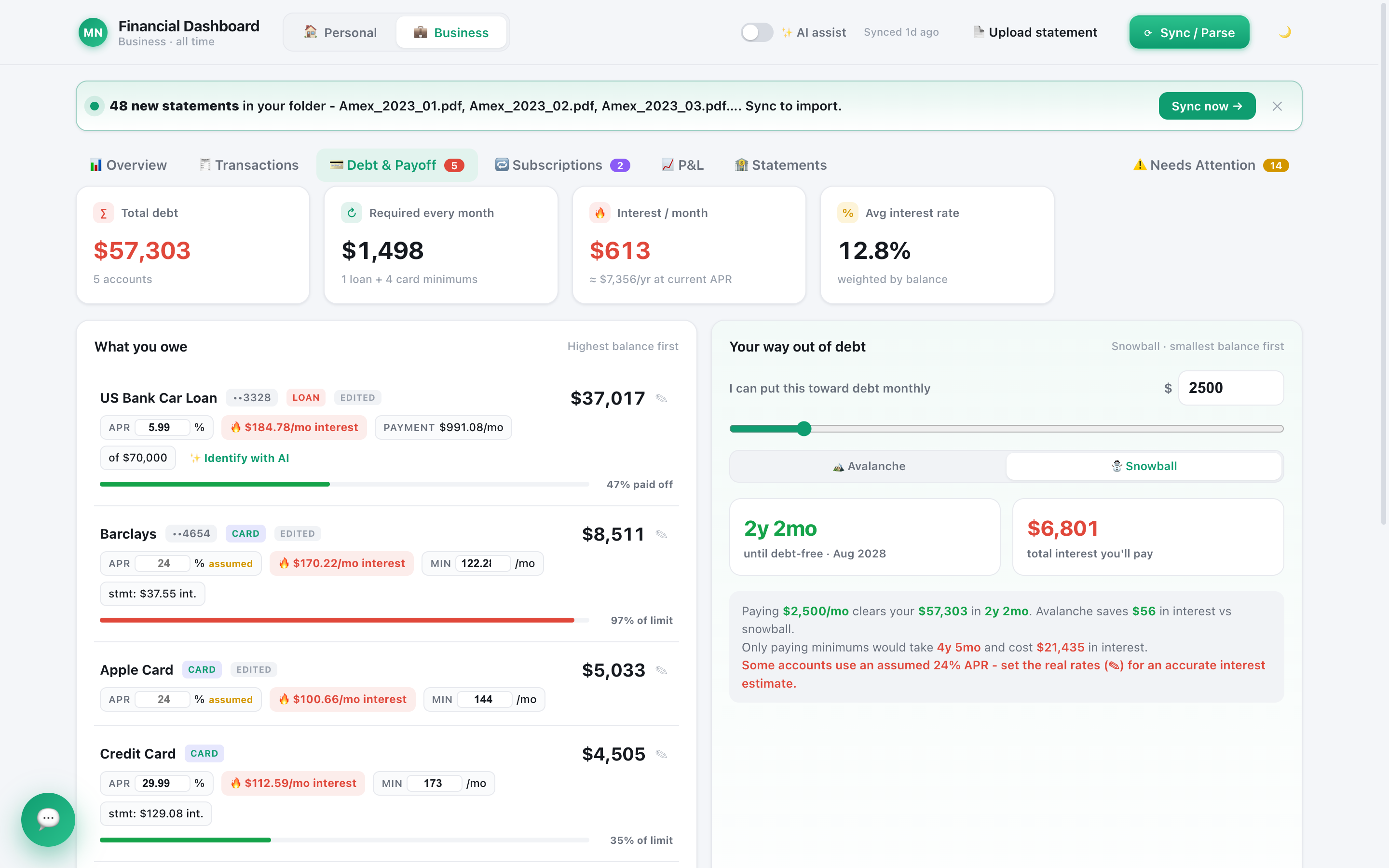
Ask "I'm getting a $20,000 bonus, which debts should I pay?" and the assistant does not improvise. It runs Quill's debt planner, the same one behind the Debt screen, and explains the result.
- It keeps a cash cushion first, about two months of your typical spending, so a windfall never leaves you without a buffer.
- It pays the most expensive debt first, but treats 0% intro offers carefully: a balance your monthly payments will clear before the promotion ends does not need the lump sum, while one about to jump to a high rate does.
- It shows the amount for each debt, the interest saved over the next 12 months and in total, and how many months sooner you are debt-free.
The planner's choices were checked against brute force, every possible order, on randomly generated test cases. If you want the background on the two classic strategies, read debt snowball vs avalanche. The plan is information, not financial advice, and Quill never moves the money for you.
Getting your books ready for your accountant
Tell the assistant your situation, for example "I have an S corporation filing a 1120-S, what do I send my accountant?", and it builds a document checklist for that entity type and checks your books against it. You get three lists: what is ready, what is not ready (with the dollars involved and a link to fix it), and what a bank statement can never show, like payroll filings, last year's return or your depreciation schedule.
It stays on the right side of a firm line: it never says what is tax-deductible. It is a document checklist, not tax advice, and your accountant makes the calls. Sorting the charges themselves is faster with good categories, which our guide on automatically categorizing bank transactions covers.
General AI chat, ChatGPT Finances and Ask Quill compared
| Question | General AI chat | ChatGPT Finances | Ask Quill |
|---|---|---|---|
| How your data gets in | You paste or upload it each time | Linked accounts through Plaid | Statements you download, read on your computer |
| Where your financial data lives | In your chat history | On OpenAI's systems while connected | In a file on your computer |
| Figures checked against the bank's printed statement totals | No | Not described by OpenAI | Yes, every statement, to the cent |
| Changes your records | No records to change | Not described by OpenAI | Proposes changes; your click applies them |
| Moves money | No | No (cannot change your accounts, per OpenAI) | No |
| Personal and Business kept apart, accountant files | No | Not described by OpenAI | Yes, with QuickBooks and tax-package exports |
ChatGPT Finances does things Quill does not, like credit monitoring, investment tracking and phone access. Pick the trade-off that fits you. And it does not have to be either/or, because Quill's assistant can run on the ChatGPT subscription you already have.
Which AI powers it, and what that AI sees
You choose the AI: connect your Claude subscription (one click on Mac), your ChatGPT subscription, or an Anthropic, OpenAI or Google API key. There is no extra AI fee from Quill, and every answer says which AI answered.
Be clear about one thing: every one of these is a cloud service. When you ask a question, a summary of your finances (totals, trends, top categories and merchants, largest charges, subscriptions and debts) and any charges the assistant looks up go to the provider you picked. Your PDF files are never uploaded, receipts are read on your computer, and nothing goes to an AI until you ask it something or press an AI button. Switch AI off and Quill keeps working as a private, local finance app.
Who it is for
Ask Quill suits people who want an AI that can take real work off their plate without handing over a bank login: freelancers and small business owners who need clean books for an accountant, households juggling several cards and loans, and anyone who has been burned by an AI that sounded sure and was wrong. It is not a robo-advisor, a bank, or a replacement for a licensed professional. It is the assistant that keeps your records straight so your decisions start from the truth.
Every guide in this series
- Debt Snowball vs. Avalanche: Which Pays Off Debt Faster?
- How to Automatically Categorize Bank Transactions
- ChatGPT Finances vs Quill: Linked Accounts or Private Statements?
- Can ChatGPT Manage Your Finances? What It Gets Wrong
- Use Your ChatGPT or Claude Plan to Run Your Finances
- Chat With Your Bank Statements: An AI That Shows Its Receipts
- Lump Sum to Pay Off Debt: Which Debts Go First?
- Can You Trust AI With Money? Why It Gets Numbers Wrong
Frequently asked questions
What is an AI financial assistant?
It is an AI that works on your own financial records to answer questions, spot problems and help you plan. The good ones answer from your actual transactions, show you where each figure came from, and only change anything after you approve it.
Can Quill's AI assistant move money or pay bills?
No. Quill moves no money, pays no bills and cancels nothing. It can look things up, open the right screen, build reports and propose changes to your books, like setting a category or a rule, which only apply when you click.
How does Quill's assistant avoid making up numbers?
It answers only from statements Quill has already checked against the bank's printed totals, runs real look-ups instead of doing arithmetic in its head, and replies "Not in your data" when your records cannot answer. It never ranks a debt whose interest rate it does not know; it asks you.
Which AI does Quill use?
The one you choose: your Claude subscription, your ChatGPT subscription, or an Anthropic, OpenAI or Google API key. Every answer says which AI answered. All of these are cloud services, so the provider you pick sees what it needs to answer each question.
Is Quill's AI assistant a financial advisor?
No. It is not a licensed financial advisor, it never recommends investment products, and it never says what is tax-deductible. It organizes your records, answers questions about them and helps you plan, and the decisions stay yours.
Put an AI to work on books you can trust
Quill proves every statement to the cent, then lets its assistant answer, plan and propose changes you approve. One-time purchase, no bank login.
Get Quill